Afresh User Onboarding and Learning

Afresh User Onboarding and Learning

Interactive onboarding for Afresh

Introduction

Afresh is a grocery tech company specializing in digital solutions for optimizing fresh item ordering in stores, including produce, meat, seafood, and deli products. Our machine learning technology predicts ordering needs, crucial for perishable items with limited shelf life. For instance, a produce manager can use Afresh to forecast strawberry quantities to avoid overstocking and wastage.

As we scaled to grocery stores across the U.S., we realized we needed to improve our product onboarding experience. Getting users effectively onboarded was critical for setting them up for success in their stores, establishing good habits, and improving their sales whilst reducing shrink (or food waste) – two top of mind goals for our customers.

The problem

Our problem was that our current onboarding experience was pretty overwhelming for our users. It consisted of one virtual training they were supposed to take on their own time and two intense in-store trainings where a member of the Afresh team set up their store, and guided them through writing their first order on our app.

These trainings were overwhelming because users were supposed to take in a lot of information at once. Once an Afresh team member left the store (after two days of training them in-person), we saw that stores struggled remembering everything they were supposed to recall to write a good order. Below is a user journey of a new user's experience with Afresh.
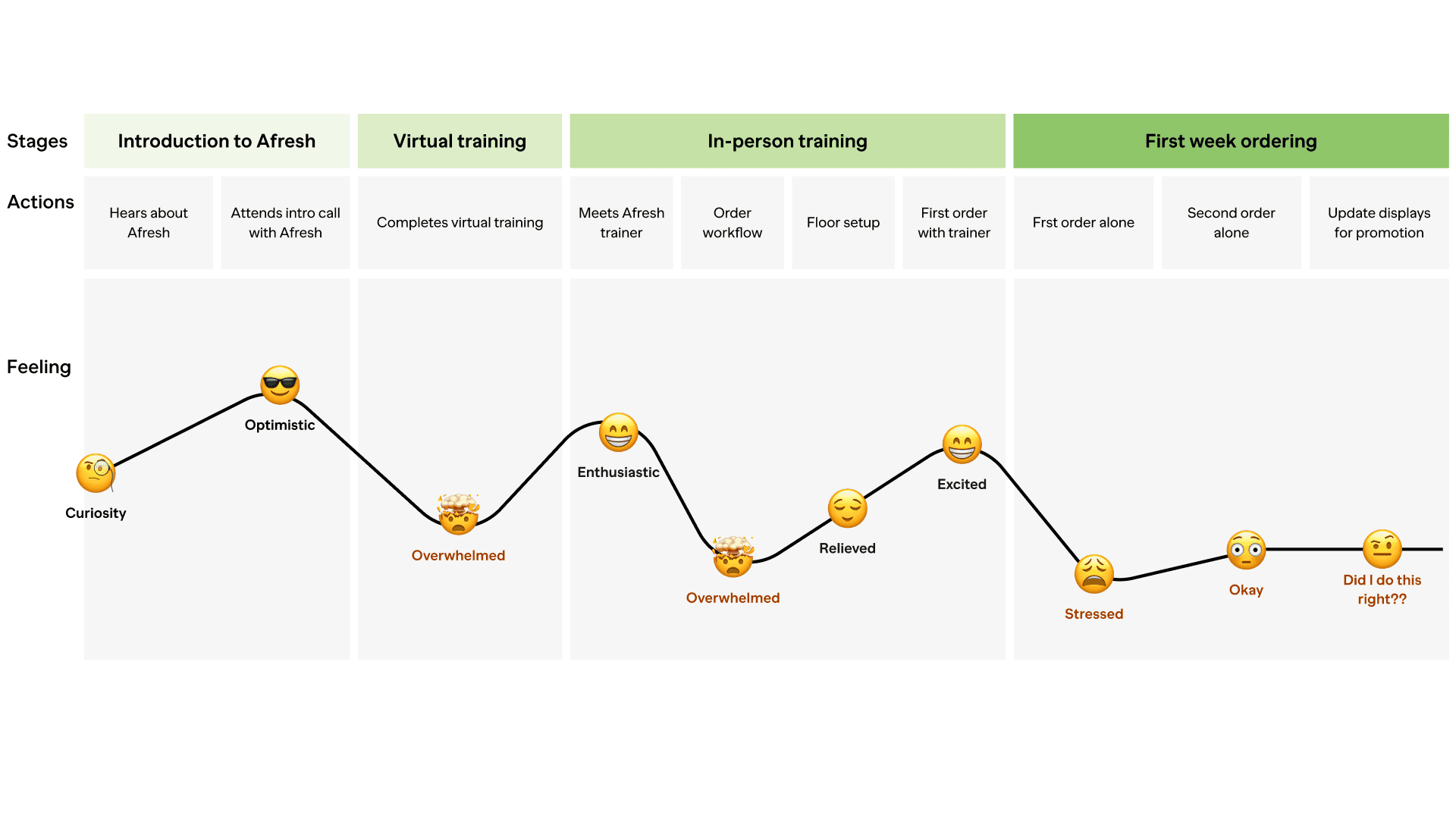
We needed to reduce the overwhelming quality of our training and improve user sentiment during the first week of ordering. We wanted them to feel prepared and positive rather than overwhelmed and stressed.

Business impact

The inadequate onboarding process was harming our business, with pilot stores facing significant challenges in using Afresh during their initial 10-day trial period. This period is crucial for securing new customers. If users didn't grasp the product correctly or adhere to essential guidelines, their stores showed no improvement in sales or waste reduction. This undermined our ability to showcase Afresh's positive impact and secure deals.


Our current in-app training mode had little guidance

Our current app experience had a training mode setting where users could play around with the workflow without sending a real order, but it was under utilized and didn't provide any guidance or prompts.


Our hypothesis was that offering thorough in-app training would improve users' retention of information. Instead of expecting them to memorize everything in a short time, they could access app guides for quick walk-throughs and receive ongoing tips within the product. By sending our product to users before their training, they could familiarize themselves with it, easing the training process and reducing overwhelm.

Our goals

Our goals

Our goals

We needed to greatly improve our onboarding experience as well as increase the amount of power users of our app. We wanted to create an in-app experience our users could tap into when they needed it in order to learn and up-level on their own.

Early storyboarding

In our early product visioning for this new experience, we imagined a world where we could send users an exciting swag package along with our app and everything would be self-service. They could onboard through a QR code and independently navigate their way through the Afresh product.

We decided, however, that this was not the right time to completely eliminate our in-person training. This two day period was really important for establishing relationships and learning about our stores and we were not ready to conduct our training without this in-person time.

Research

We conducted a comprehensive internal survey on our current onboarding and training experience to dig into the problems a bit more. Unfortunately we could not survey our actual users at this time because we were already sending them requests for feedback on some feature work we were completing. Instead, we surveyed members of our implementation team who had extensive experience on-the-ground training our users during pilots.

The research confirmed what we had already found in our initial journey as well as some issues for our Afresh trainers:

  1. Users felt overwhelmed by all the information presented and had a hard time retaining a lot of it

  2. Our Afresh trainers were completely swamped during this two day training period

    Not only were they expected to set-up their stores for success (including configuring basic app-settings catered to that particular store), but they also had to train multiple users as well as navigate language barriers.


Brainstorming solutions

During a workshop I led, we came up with more ideas to tackle the problem of user information overload as well as reduce some of the work for our Afresh trainers. The most interesting to us were:

- make training more interactive and interesting, and bring it into the app
- break down learning into bite-sized chunks through in-app guides (this would mean we only surface information when a user needs to learn something rather than have them memorize it)
- use quick videos and gifs to break up the amount of text and provide more visuals


First round of wireframing

I began designing a guided workflow experience with nudges to explore various parts of our app UI. We wanted the main training experience to better utilize our training mode feature, getting users into that mode to play around without fear. At this time we were also contemplating a new help menu at the top of the UI. This became out of scope for the final designs.

We also wanted to explore more encouragement within the app through some illustrative moments and positive copy to humanize the experience and keep users feeling like they were making progress in their learning.


Roadblock: there was no engineering resources to build this experience

Unfortunately we came upon an issue early on. We didn't have enough engineering resources to build our ideal training experience within our product.

Myself and my product manager were really passionate that we needed in-app training sooner rather than later however. We decided to figure out how we could do this without any engineering.


The proposed solution

After conducting research on several different no-code third party tools, we came across one called Pendo that met all of our needs. With Pendo, we could deploy guides within our product to teach the user where features lived and what they were used for. We could also conduct surveys, and track the success and usage of our guides with Pendo analytics. Here's a link to our initial proposal.

We worked together to not only present on the ways this solution could benefit our company and save money by replacing un-used tools we had acquired (such as mix-panel) but also walked our leadership team what the experience would look like through quick figma prototypes.


Final in-app training experience

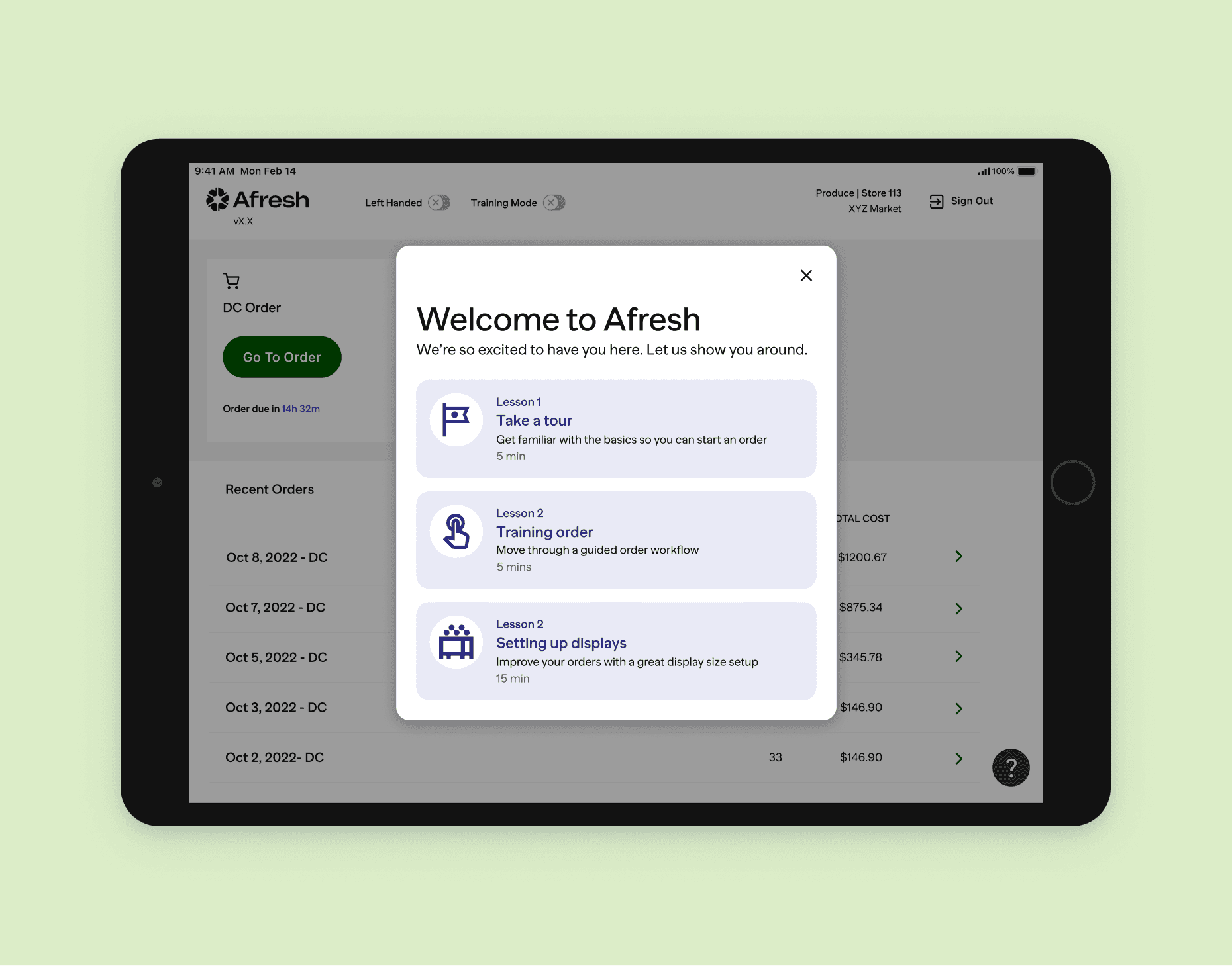
Our new in-app training experience allowed our users to get acquainted with our UI and get shown around the app. They could complete the short lessons and feel a lot more confident before their two-day training session with an Afresh trainer. We hoped this would make them feel less overwhelmed and more accustomed to the workflow.


How would we measure impact?

Another feature that became part of this project was to build out in-app user surveys in order to capture quick feedback and get faster pulses on how our new features and training was being received. I worked closely with my product manager to build out a series of survey templates we could deploy for various scenarios across the app, from NPS to feature surveying.


Final outcomes

Integrating a no-code solution into our product was not easy as we had some glitches along the way. One, it took longer than we expected to get everything set-up and working. Two, our engineering team did need to help us with a few things we couldn't do ourselves.

We also had to come up with a lot of process documentation on the new software, as well as teach our teams how to use it. It's all a work in progress right now but next week we are sending guides and surveys to our actual customers to see how they respond. What's amazing is we have all the analytics to track how our users respond to our guides – are they able to find them and open the guides, and what do they think of them? We can track all of this through our dashboard and surveys we send them. Having real data to use is a huge win for us when it comes to training and onboarding our users since we had no clear signal on this previously.

This project is still a work in progress so stay-tuned for more updates!


ML Howell

Designer

Simpler the better

© 2025 ML Howell

ML Howell

Designer

Simpler the better

© 2025 ML Howell